|
|
|
|
|
|
|
|
|
|
|
|
|
|
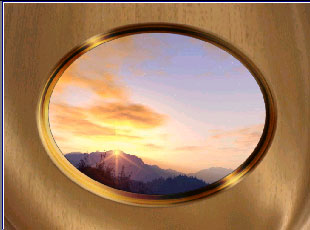
Here’s how to use Vegas Video to create a composition combining your footage, a Hotcakes background, a Hotcakes Overlay, and a Hotcakes Image Matte. |
||||||||||||
|
1. Import your footage, any Hotcakes background movie. We selected the Champagne loop from Wedding Essentials Vol 1. |
||||||||||||
|
2. Import the OvalFrame image sequence found in the TGA Overlays folder. Click here to review the import tutorial. |
||||||||||||
|
3. Import the OvalMatte still image found on Wedding Essentials Vol 1 in the Stills and Mattes folder. |
||||||||||||
|
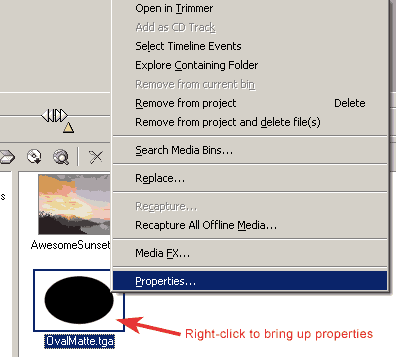
4. Right-click on OvalMatte now in the Media Pool to bring up its Properties panel. |
||||||||||||
 |
||||||||||||
|
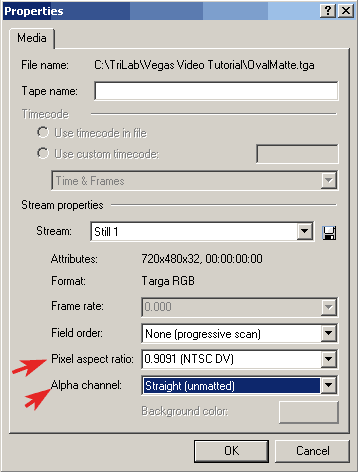
5. Set Pixel Aspect Ratio to 0.9091 (NTSC DV). Set Alpha Channel to Straight (unmatted). |
||||||||||||
 |
||||||||||||
|
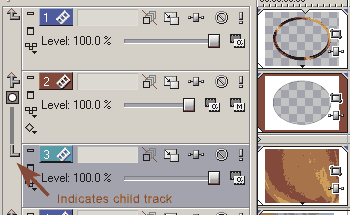
6. Drag the OvalMatte targa sequence to Track 1. Drag the OvalMatte still to Track 2. Drag the Champagne loop to Track 3, and AwesomeSunset to Track 4. |
||||||||||||
|
|
|
|
|
NOTE: Copy all Digital Hotcakes animations from CD or DVD to your video hard drive before importing them. |
|||
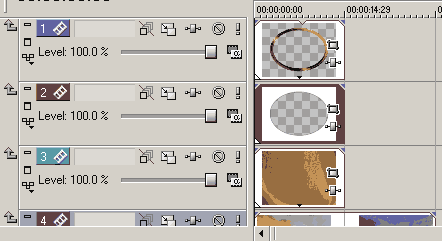
 next to Track 3 to make the Champagne movie a child track to the track above.